Babysitter Links A night with a sitter, without handing over the account
A read-only link to the board that works on the sitter’s own phone and ends by itself after 4, 8 or 12 hours.
Their phone, your child’s board
Send a babysitter, grandparent or relative a link. It opens your child’s board on their own phone, with the same tiles in the same places, and it speaks. They do not need an account.
It cannot be changed, and it ends
- The board is read-only through the link: nothing can be added, moved or deleted.
- It stops working by itself after 4, 8 or 12 hours, even on a tab left open.
- Stop it early from Settings at any time.
- Up to five links can be live at once.
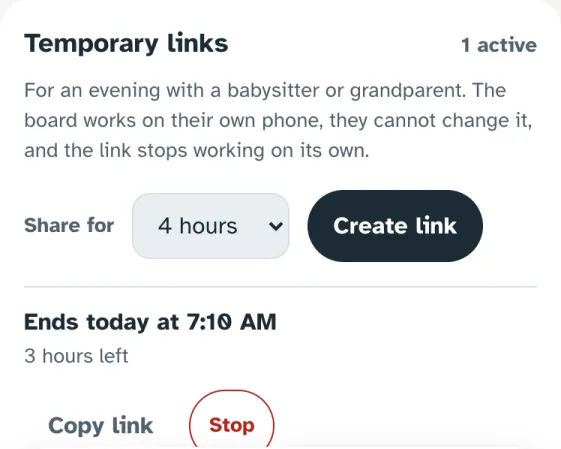
Real screens from the Speek2Me app. The names are made up.
More of what it does
Same Board Everywhere
Change a word on one device and it is on every other within seconds, in the same place, so the motor memory a child builds works everywhere.
Natural Voices
15 natural voices, men’s and women’s, American and British, that run on the phone or tablet itself and keep speaking offline. Any tile can play a voice the family recorded.
Works Offline
Once the board has been opened on a device and its voice downloaded, it keeps working and speaking with no Wi-Fi, and changes made offline are sent when the connection is back.
Invite by Code
A six-character code that works for 10 minutes, a QR code to scan, or a link that works for 24 hours. You choose whether they can change the board, and you can remove them at any time.
Board Hand-over
A teacher or speech therapist can set a board up for a student, try it in a session, and send the family a link that makes the board theirs.
Copy From Another Board
Take a photo of a page from another AAC board and Speek2Me makes a folder with every tile in the same place, gaps included. The photo is read on the device and never uploaded.
In the apps, in testing
Child Lock
A PIN keeps a child out of editing, Settings and signing out on every device the account uses. Speaking is never locked.
Be one of the first in
We are inviting families, teachers and speech therapists in small groups. It runs in any browser; apps for iPhone, iPad and Android are in testing.